Invoice Posting

Main Menu: Accounts Payable - Invoice Posting or alternatively from the Top Menu: Accounts Payable - Invoice Posting
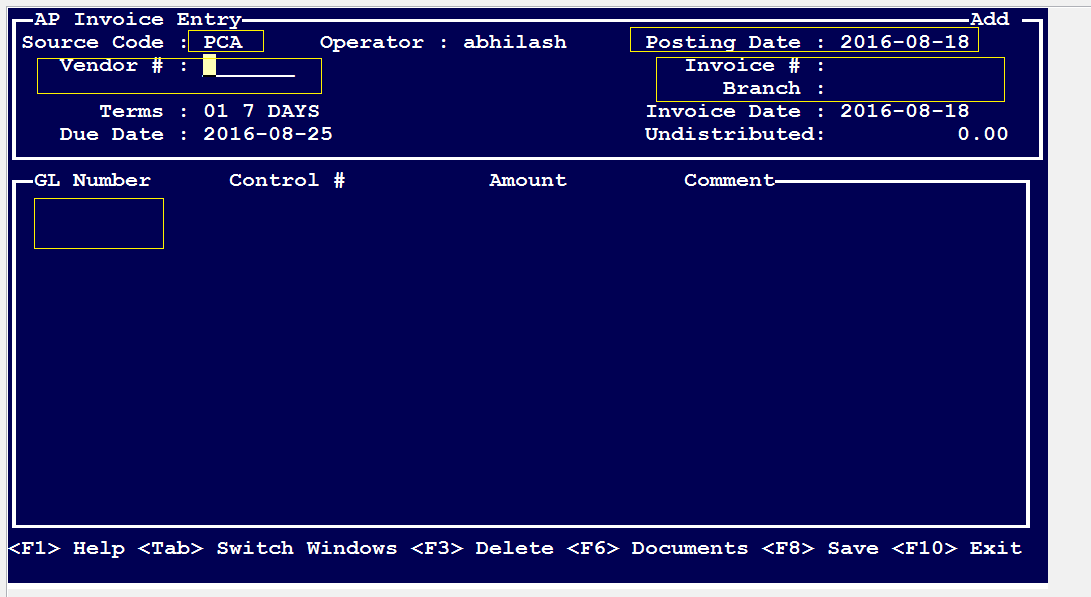
Referring to the snapshot above.
Source Code: Select the purchase journal where you want this Invoice to be recorded. Press F1
Posting Date: Select the date
Vendor: Select the Vendor where this invoice is from.
Invoice #: Enter the appropriate Invoice # that you are paying, and to what Branch # you want to apply this to.
Tab to switch between windows
GL Number: This is an account # for your documenting purposes where you want to apply the Invoice posting Payment To the above GL.
Comments
0 comments
Article is closed for comments.