Sending Customer Log Capture Instructions (emailing error logs are hit and miss)

Problem:
In the event Candata Error log emailing does not work these are the manual steps to take so that the Customer can send their error log to us.
Solution:
How to capture an error log:
(note, the 'Email to support' option on error pop-ups, is hit and miss, we are aware of this. Please copy and paste into this ticket)
- When Candata Error Pop-up is presented.

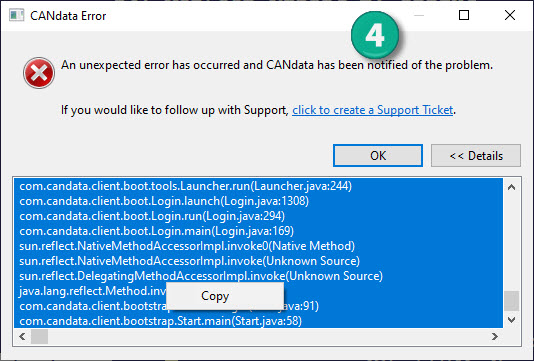
- Select "Details" button. You are presented with a window containing the error log.

- Select the first line by left clicking the mouse on the top line in the error log (it will become highlighted), scroll all the way to the last line by dragging the right slider. While holding the SHIFT key, left click on the last line, so that all lines are highlighted, as pictured in the image.

- Finally, right click on the highlighted lines and you will see the word "copy". Select copy to move the error log information to your windows clipboard. Open this email/ticket and PASTE the log into
this ticket
.
It should look like this (partial log pasted for brevity):
java.lang.RuntimeException: Didn't find any services for interface com.candata.admin.client.zoo.services.LogsUIService
com.candata.swt.xwt.XWTViews.getServiceReference(XWTViews.java:218)
com.candata.admin.client.zoo.view.swt.LogsView.getService(LogsView.java:71)
com.candata.admin.client.zoo.view.swt.LogsView.setServices(LogsView.java:65)
com.candata.admin.client.zoo.view.swt.LogsView.configureView(LogsView.java:48)
.
.
.
sun.reflect.DelegatingMethodAccessorImpl.invoke(Unknown Source)
java.lang.reflect.Method.invoke(Unknown Source)
com.candata.client.bootstrap.Start.doLogin(Start.java:91)
com.candata.client.bootstrap.Start.main(Start.java:58)
You have completed the error log copy process.
Comments
0 comments
Please sign in to leave a comment.